
1
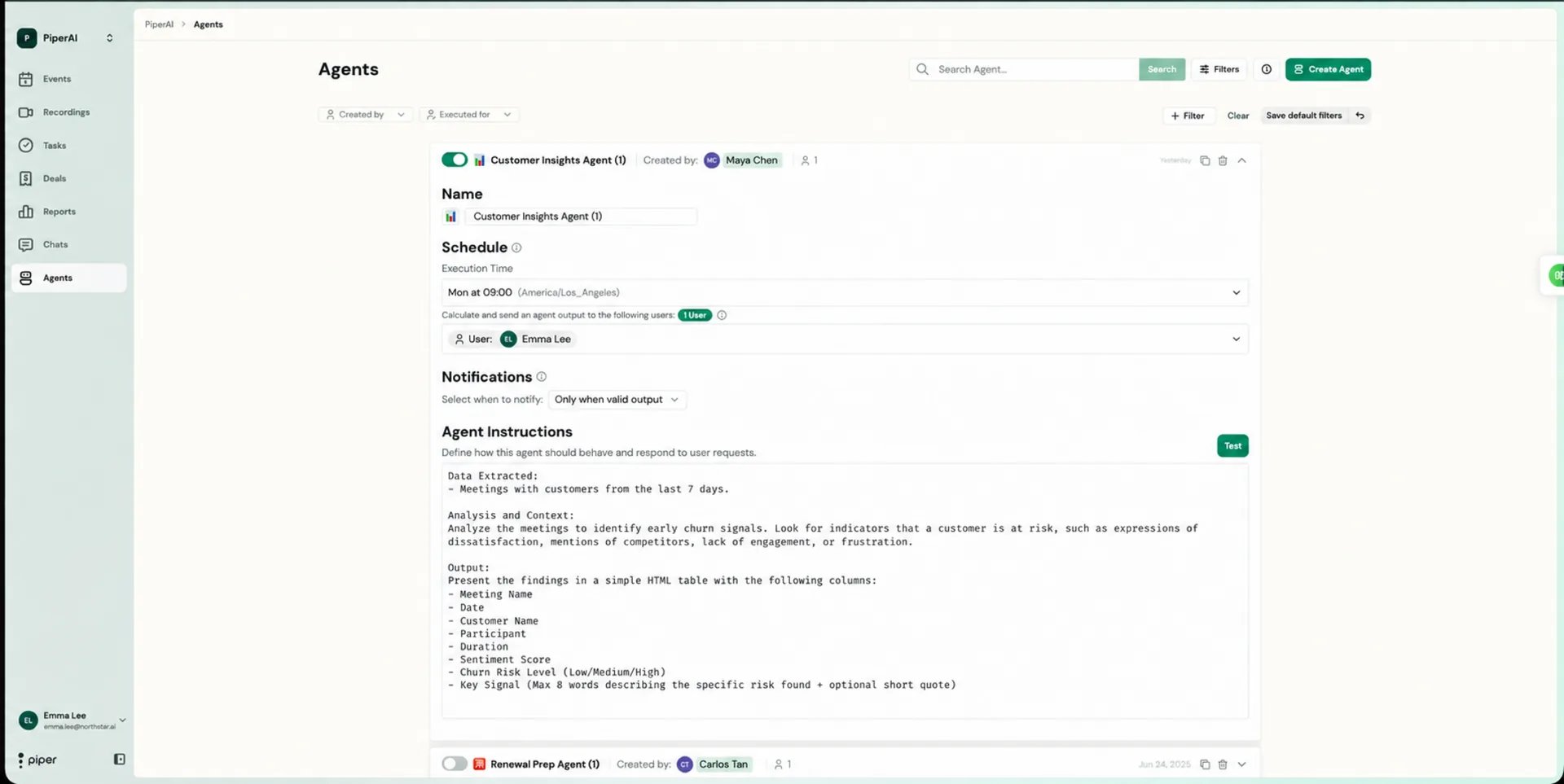
Schedule — When Does It Work?
Define how often your agent runs. You can set it to trigger on a recurring cadence or after specific events.Common scheduling options include:
- After every call — ideal for real-time coaching or immediate post-call summaries
- Daily — good for pipeline monitoring or overnight digests
- Weekly — best for rollup reports, sentiment snapshots, or team-level reviews
2
Scope — Who Does It Watch?
Set which team members’ calls the agent analyzes. You can target:
- All users in your workspace
- Specific teams or groups
- Individual reps or account managers
A single run analyzes up to 100 meetings, and a scheduled run covers up to 15 targeted users at a time. If the scoped users generate more activity than that, narrow the scope or increase the run frequency so no meetings are missed.
3
Brain — Instructions & Principles
Write the instructions that tell your agent what to look for, how to analyze it, and what to output. This is the most important part of your agent — the quality of your instructions directly determines the quality of your results.Your instructions should answer:
- What signals or patterns should the agent look for?
- What should it flag, score, or summarize?
- What format should the output take (bullet list, table, narrative, etc.)?
- Are there specific meeting types or time frames to include?
4
Capabilities — Tools
Select which tools and data sources your agent can access during its runs. Granting the right capabilities ensures the agent has the context it needs without unnecessary access.Available capabilities include:Enable only the capabilities your agent needs. A coaching agent focused on call quality only needs Transcriptions. A deal risk detector benefits from combining Transcriptions with CRM Data for full context.
- Transcriptions — read the full text of recorded calls
- CRM Data — access deal, contact, and opportunity records from your connected CRM (HubSpot, Salesforce, or Pipedrive)
- Notes — read meeting notes created by you or your team
- Tasks — view and create follow-up tasks
- Email — read threads from your own connected Gmail/Outlook mailbox that relate to a contact or deal. Fetched on demand and not stored — this doesn’t pull emails logged in your CRM (e.g. Salesforce EmailMessage records), and it’s scoped to your own mailbox only.
If no CRM is connected, the CRM Data capability has nothing to read — agents fall back to the transcripts, notes, and tasks stored in Piper.
After You Save
Once you save your agent, it begins running automatically on the schedule you defined. You can return to any agent at any time to update its instructions, change its scope, or adjust its schedule.How many agents can I create?
How many agents can I create?
There is no set limit on the number of agents you can create in Piper. Build as many as your team needs — one per use case is the recommended approach to keep each agent focused and its outputs easy to act on.
Can I test an agent before it runs on schedule?
Can I test an agent before it runs on schedule?
Yes — after saving your agent, you can trigger a manual run to see how it performs before the scheduled cadence kicks in. Review the output and refine your instructions in the Brain step if needed.
What's the difference between an agent and a Chat query?
What's the difference between an agent and a Chat query?
Chat is interactive — you ask a question and receive an answer immediately. Agents are automated — they run on a schedule and surface insights proactively, without you needing to prompt them each time. Use Chat for on-demand questions and Agents for recurring workflows.